
E-commerce Website Development: A Step-by-Step Guide
Learn e-commerce website development step by step, from planning and design to payment integration, security, testing, and launching your online store.
Introduction
Think about the most recent item that you purchased online. There was an immediate search for your desired product, some photo viewing, and maybe a couple of reviews before you completed your payment. This seamless transaction process did not just appear by itself. Everything about the website, including the navigation, layout, and the purchase procedure were carefully thought out and implemented.
This designing and construction process is exactly what e-commerce website development is all about. Regardless of the size and type of your business, it's likely that your online shop will be the first, and possibly the only opportunity customers will have to become familiar with your company. If your website loads slowly, fails to impress, or simply does not work on a mobile device, users will quickly abandon your website. Most likely, you won't ever see them again.
The good news is that developing a solid store is not rocket science. The website development process follows certain steps, which we will discuss in this guide. You will learn the technical aspects behind the scenes, what are the features you should pay attention to, how the process takes place, and how much it costs.
What Is E-commerce Website Development?
If you want to know what e-commerce website development entails, here is your answer in its simplest form: it is the process of developing a site that allows consumers to browse for goods and purchase them over the Internet. This includes not only everything that visitors see, but all the back-end systems as well.
A simple company website basically only gives out information. On the other hand, an online store has to be able to perform multiple functions - display goods, check availability, accept payments securely, calculate shipping costs, send confirmations, etc. That is why e-commerce website development is a specialist job.
The E-commerce Website Frontend and Backend
Any website is always two-faced. To be able to make the right choices later, it is necessary to understand what the frontend and backend of the e-commerce website are.
The frontend is what your customers will see and interact with – the homepage, product pages, search bar, filters, cart, and checkout. Its purpose is to be visually appealing, intuitive and help drive purchases.
Backend, on the other hand, is all the behind-the-scenes work. It includes storing information about products, processing orders, working with payment gateways, managing user accounts and talking to various third-party tools like shipping and accounting software. Although customers won't ever see it, they can certainly sense when all the operations run smoothly.
Platform-Based vs. Custom Builds
There are two major directions you can go down. The first one is the usage of ready-made platforms like Shopify, WooCommerce, or BigCommerce. They are fast to implement and suitable for most smaller and mid-sized stores.
Another option is custom development of the e-commerce website, which involves designing it specifically for your needs. This solution requires more time and investment but gives you total freedom in terms of functionality, design and scalability. E-commerce platform development is often chosen by larger companies who build their own platform for managing several stores, vendors or regions from a single place.
Essential E-commerce Website Features
It’s not until after making a comprehensive list of website features that the development process actually begins. This ensures that there’s no loss of focus along the way and, therefore, prevents the costs from rising. The following features are among those which any e-commerce site needs from day one.
Easy Navigation and Smart Search
Shoppers should find what they want in two or three clicks. Clear categories, a visible search bar, and filters for size, colour, price, or brand make a huge difference. A search that suggests products as people type is even better.
Detailed Product Pages
Customers should be able to access everything within just two or three clicks of their mouse. The use of clearly marked categories, the presence of a search box on your site, and filters by size, color, price, and other features go a long way.
A Simple, Secure Checkout
It is here where most online businesses lose their sales opportunities. Keep the checkout short, provide guests with a checkout option, display the total cost (including shipping), and let users pay using the popular means. Don't forget to use an SSL certificate and payment gateway.
Inventory Management System
There is nothing more annoying for the buyer than buying something that is out of stock. Using the inventory management system, you will keep track of the stock levels in real time, get notifications about low stocks, and synchronize the process with other sales channels if needed. Thus, you will be protected against overselling.
Customer Accounts and Order Tracking
Let returning shoppers save addresses, view past orders, and track deliveries. These small conveniences build trust and bring people back.
Other Useful E-commerce Website Features
Apart from must-have features mentioned above, some additional ones may positively impact your sales:
Wishlists so shoppers can save items for later
Discount codes, gift cards, and loyalty points
Emails reminding about abandoned carts
Live chat or a help widget
Analytics of which products sell and on which pages users leave
Multilingual and multilingual website versions (in case you sell internationally)
Not all the listed features should be implemented right away. Start with those that really matter to your customers.
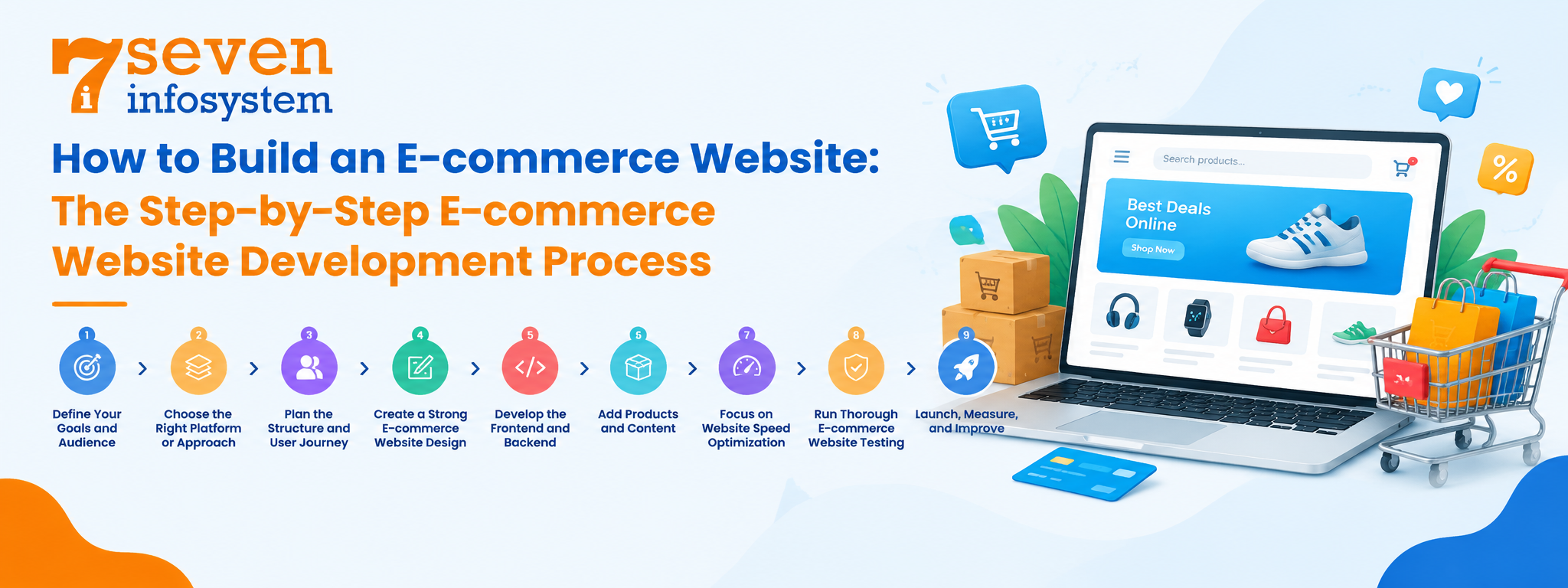
How to Build an E-commerce Website: The Step-by-Step E-commerce Website Development Process
Now for the part most people want to know: how to build an e-commerce website that actually sells. The steps below apply whether you're launching a small shop or a large catalogue.
Step 1: Define Your Goals and Audience
Begin with the fundamentals. What are you? Who are you trying to sell to? How products will you have when you start and how many do you plan to have in two years? Do you deliver in your local area or all, over the world? Your answers will affect every choice you make later from the system you pick to the functions you add.
It is also useful to look at some of your competitors. Take note of what they do and where their stores feel difficult to use. Those weaknesses are your chances to do better.
Step 2: Choose the Right Platform or Approach
After defining your aims and objectives, it is time to choose the right approach for your online store. For example, a hosted solution offers a quick and cost-effective way to start selling online. However, an open-source platform like WooCommerce or Magento provides more flexibility because it allows greater customization, although it requires more technical support. Additionally, a fully custom-built store makes sense if your business has unique workflows, attracts high traffic, or plans to scale quickly.
Therefore, think about your long-term goals before making a decision. Although moving your store to another platform is possible later, the process can be expensive and complicated. Finally, choose a platform that meets your current needs while supporting your business as it grows.
Step 3: Plan the Structure and User Journey
First, create a sitemap that includes the homepage, category pages, product pages, shopping cart, checkout, and customer account pages. Also, include essential information pages, such as FAQs, shipping details, and return policies, so customers can easily find what they need. Next, map the customer journey from the moment visitors land on your website until they complete a purchase. For example, simplify navigation and checkout because unnecessary steps can distract shoppers and lead to lost sales. Finally, review the entire journey to ensure customers can browse products and place orders without difficulty.
Step 4: Create a Strong E-commerce Website Design
Good e-commerce website design is about more than looks. It builds trust, highlights products, and makes buying feel effortless. Keep layouts clean, use plenty of white space, and stick to a consistent colour palette and font style that match your brand. Calls to action like "Add to Cart" should stand out clearly.
Responsive e-commerce website design is also very important. Over 50% of shopping online takes place through smartphones and tablets today, and it is necessary to make sure that your website is responsive and fits any screen size. Buttons have to be large enough to facilitate tapping; images – to resize appropriately; and checkout process – to run as well on a mobile device as on a PC.
Step 5: Develop the Frontend and Backend
Here, the design becomes functional. A developer creates all webpages that the customer sees and connects them to the backend that deals with product information, orders, payments and users' profiles. It is here where the developer sets up all integration including payment gateways, shipping carriers, marketing services, and the inventory management system.
Security belongs in this step, not as an afterthought. That means HTTPS across the site, secure password handling, regular updates, and following payment card security standards.
Step 6: Add Products and Content
Add products to your website using titles, accurate pricing, variants, and high-quality descriptions. It is advisable not to use manufacturer's description to avoid plagiarism but also make the experience easier for visitors and search engines. Make sure to include some pages too including return policy page, shipping policy page, and an About page about your store.
Step 7: Focus on Website Speed Optimization
Slow stores lose money. Even a one-second delay can reduce conversions, and search engines favour fast sites. Website speed optimization should be part of the build, not a later fix. Compress and resize images, use modern formats like WebP, enable caching, limit heavy scripts and plugins, and serve content through a CDN. Check your Core Web Vitals regularly with tools like Google PageSpeed Insights.
Step 8: Run Thorough E-commerce Website Testing
Never launch an e-commerce website without testing. Make sure the site works across browsers, phones and tablets. Place real test orders using every payment method. Verify that discount codes work as expected emails are sent on time stock levels update correctly. Forms show clear helpful error messages. If you expect traffic during sales run load tests to see how the site handles it. It is always better and cheaper to find a checkout before launch than after.
Step 9: Launch, Measure, and Improve
Once all testing is complete and everything works as it should go live. But launch day is not the end— it’s the beginning. Set up analytics tools to track how visitors move through your site. Pay attention to where shoppers leave the process— at the checkout. Collect customer feedback. Keep making improvements. Tweaks to product pages checkout steps or page speed can lead to results, over time. Always be ready to refine and grow.
E-commerce Website Development Cost: What to Expect
A question that many business owners ask is about e-commerce website development cost. The honest answer to e-commerce website development cost is that it depends on what you need. A simple store and a large custom marketplace are different projects and the price tags for e-commerce website development cost reflect that.
Here is a rough guide to ranges for e-commerce website development cost. Treat these figures as numbers because rates for e-commerce website development cost vary widely by region, team and scope.
Type of store | Typical budget (USD) | Best for |
DIY on a hosted platform | $500 – $3,000 | New sellers with a small catalogue |
Professionally built platform store | $5,000 – $25,000 | Growing brands that want a polished look |
Fully custom build | $30,000 – $150,000+ | Large catalogues, complex workflows, high traffic |
What Affects the Price?
Several factors push the cost up or down:
The choice of the platform: Hosted platforms are less expensive initially but have monthly payments, whereas a custom-developed website is more expensive to build but has no recurring charges.
Complexity of the design: The cost of a premium template will be lower compared to a fully custom-built design.
Functionality and integration: Integrating the ERP system, CRM system, or warehouse software will take additional time for the development.
Quantity of the items: Large catalogues require more work in terms of configuration, data migration, and testing.
Additional expenses: The hosting, applications, security, payments, and maintenance are annual expenses to consider.
It is better to develop a good initial product, launch it, and then buy additional functionality based on the customer behavior.
Should You Hire an E-commerce Website Development Company?
Of course, you can create a simple online store yourself using drag-and-drop platforms. However, if your store requires specific features or needs to handle high traffic, professional assistance can make a significant difference. For example, experienced developers can customize your website, improve its performance, and support your business as it grows.
The main advantage of hiring an e-commerce website development company is that it brings together specialists in design, development, testing, and strategy. Moreover, an experienced team can identify potential risks early and take steps to prevent costly errors. As a result, you can launch a reliable online store that delivers a better shopping experience and supports your long-term business goals.
What to Look for in a Development Partner
Portfolio of live online stores for review and testing
Experience in the platform or technology to be used
Honest pricing policy and detailed project scope
Good communication and specified project manager
References from previous customers
Support and maintenance services after launch
Find out how they will approach the problems of speed, security, and mobile-friendly performance of your future store. Those who are talking with confidence about these things, but do not overload you with technical terms, are your candidates.
Conclusion
Successful e-commerce website development depends on setting clear objectives, designing effectively, and building reliable technology. Moreover, continuous improvement helps businesses adapt to changing customer needs. By understanding each step of the online store development process, you can make informed decisions and avoid common mistakes that may affect your business growth.
Therefore, put your customers at the heart of every decision. Make sure your store loads quickly, works smoothly on every device, and offers a simple shopping experience. For example, you can improve navigation, simplify checkout, and optimize product pages to help customers complete their purchases. Finally, start with the most important features, measure their performance, and make improvements as needed. Whether you build the store yourself or hire professionals, a well-organized e-commerce website can become a valuable asset for your business.
FAQs
1. How long does it take to build an online store?
A simple platform-based store can be ready in two to six weeks. A fully custom build usually takes three to six months, depending on features and integrations.
2. Which platform is best for a small business?
Hosted platforms like Shopify are great for beginners because they're quick to set up and easy to manage. WooCommerce suits businesses that already use WordPress and want more control.
3. Why does mobile-friendly design matter so much?
Most online shoppers now browse and buy on their phones. If your store is hard to use on a small screen, you'll lose a large share of potential sales.
4. Do I need ongoing maintenance after launch?
Yes. Regular updates, security patches, backups, and performance checks keep your store safe, fast, and running smoothly.
5. How can I make my online store load faster?
Compress images, use caching, choose quality hosting, and remove unused apps or plugins. A content delivery network also helps pages load quickly for visitors everywhere.