ERP Software Guide: Ultimate Resource for Growing Business
Learn how ERP software helps growing business streamline operations, improve efficiency, and drive sustainable growth.
Introduction
As businesses grow, their operations become more complex. Managing finance, inventory, sales, purchasing, and customer data can quickly become challenging. Many businesses start with spreadsheets or standalone software. These tools may work well during the early stages of growth. However, larger companies often need a more integrated solution.
ERP software connects key business processes through one centralized system. It helps teams access accurate data and work more efficiently. When choosing ERP software for a growing business, look beyond its features. Consider how well the system can support your long-term needs.
Whether you run a company that wants affordable ERP software, a factory that needs a manufacturing ERP service company that wants an ERP solution tailored for service work.
What Is ERP Software?
Enterprise Resource Planning software is a business management tool created to link and handle parts of a company within one single system. Having financial, inventory, buying, selling, human resources and manufacturing details in different programs an ERP system combines these areas and lets them exchange information.
For example when a customer makes a purchase an ERP system that is connected can link that action with stock levels, billing, buying making products and financial records. This cuts down on entering the data over and over again and ensures that all departments have the same information.
The advantages of ERP software go beyond keeping data. A set up ERP can increase transparency, automate regular work, help with better planning and give leaders up-, to-the-minute views of how the business is doing.
How Does ERP Software Work?
ERP software uses a centralized database and interconnected business modules to bring different parts of a company together. Each team can access the tools it needs while sharing real-time information with other departments.
For example, when a customer places a sales order, the ERP software automatically updates inventory levels. When inventory falls below a set threshold, the system alerts the purchasing team so they can take action. In manufacturing, sales demand can guide production planning. Once the team completes production, the ERP system updates inventory and financial records automatically.
This connected approach prevents information from getting trapped in separate systems. Employees no longer need to transfer data manually between different applications. As a result, businesses can improve data accuracy, reduce errors, and speed up daily operations.
Modern ERP software can also provide cloud access, workflow automation, dashboards, AI-powered tools, mobile applications, and third-party integrations. Companies can use these capabilities to manage routine operations today while building a stronger foundation for future growth.
What Business Functions Can ERP Software Manage?
ERP platforms can cover business functions depending on the system and modules chosen. Common areas include:
- Accounting and financial management
- Sales and customer management
- Inventory and warehouse operations
- Procurement and supplier management
- Manufacturing and production
- Project and service management
- Reporting and business intelligence
- Workflow automation
For instance, an ERP Accounting system could handle invoices, expenditures, payments, accounts receivable/payable, financial statements, and all accounting activities. ERP Inventory Management system could track inventory levels, warehouse movements, transfer orders, and reorder level.
It is recommended to choose necessary modules based on your needs and not to spend money for useless modules.
ERP vs. Other Business Management Software
The conventional business applications tend to revolve around a certain particular function. For instance, accounting applications deal with finances, customer relationship management applications with customer relationships, inventory applications with stocks, and human resource applications with employees.
ERP software differs by connecting these functions within a broader business system.
A customer relationship management (CRM) system may notify the sales team about a customer interaction. In contrast, ERP software can connect a customer order with inventory, purchasing, manufacturing, invoicing, and accounting across the organization.
It doesn’t have to mean that an ERP system must replace all other applications. Efficient integration of an ERP system enables organizations to link up applications wherever necessary.
Types of ERP Software
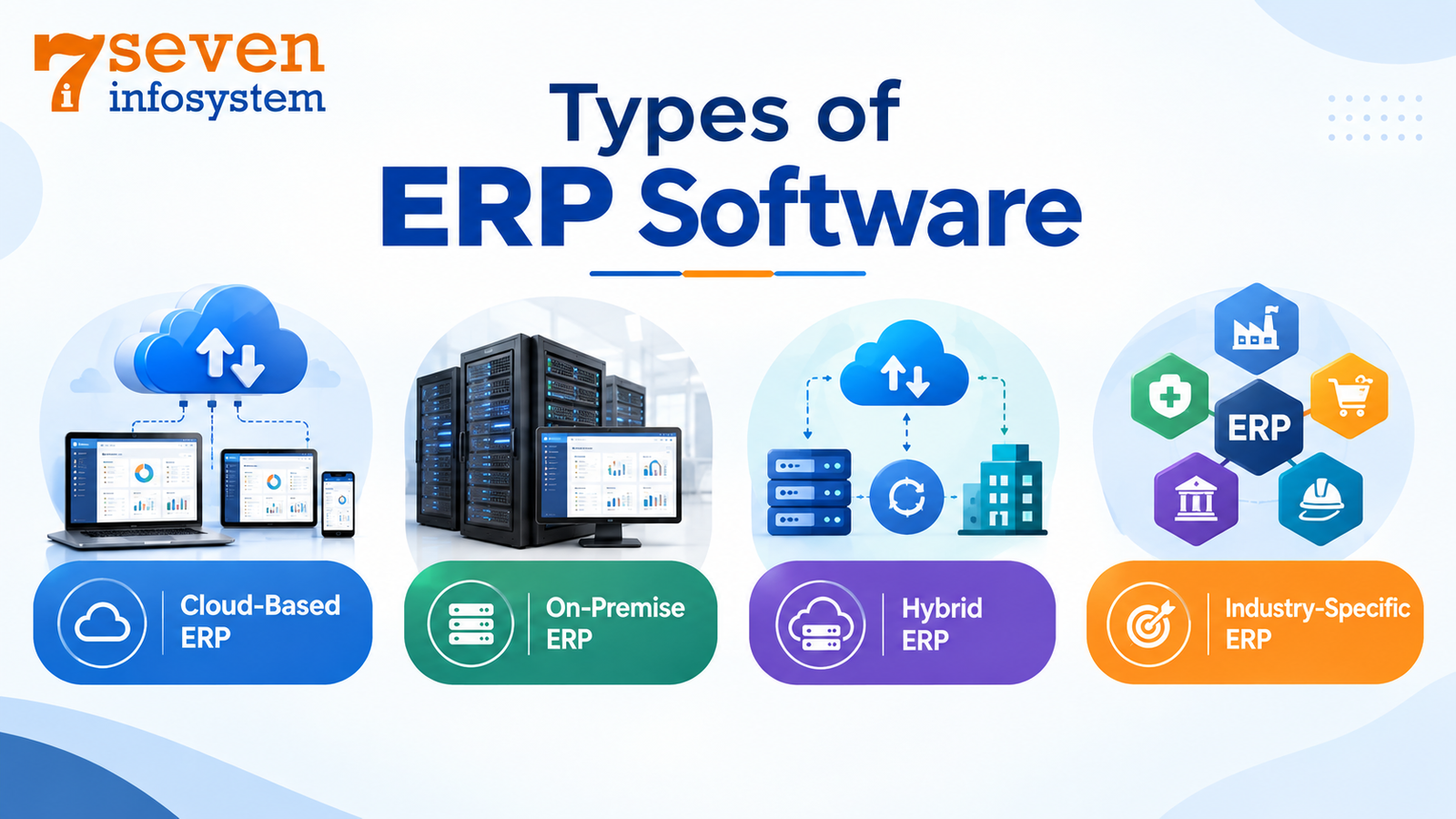
ERP systems come in different configurations and deployment options. Understanding these choices can help companies select an ERP software solution that matches their business processes, budget, and long-term growth plans.
Cloud-Based ERP
A cloud-based ERP system runs through the internet and uses services provided by an ERP vendor. Companies can access their ERP software online without maintaining servers or other infrastructure on their premises.
Growing businesses often choose cloud ERP solutions because they offer flexibility without requiring large investments in server infrastructure. The ERP provider typically handles software updates, system maintenance, and infrastructure security, allowing businesses to focus on their core operations.
Additionally, cloud-based solutions provide support for remotely-operated companies. With the use of mobile ERP solutions, employees will have access to all necessary business data even when out of office.
On-Premise ERP
In on-premise ERP solutions, implementation is done on the organization's hardware itself. The organization usually has more control over the environment, customization, and data management.
However, this solution might involve additional costs in terms of servers, IT personnel, and security, etc.
On-premise ERP solutions could be considered by organizations having certain infrastructure, customizations, compliance requirements, and data-control considerations.
Hybrid ERP
Hybrid ERP solution comprises cloud and on-premise solutions. Certain processes or data can reside on infrastructure of the organization, while other processes can function using cloud-based solutions.
Such a solution could be beneficial for organizations migrating from traditional solutions or having some infrastructure considerations.
The important point is to ensure that communication among these solutions takes place effectively.
Industry-Specific ERP
ERP specific to an industry is based on the processes involved in a particular industry sector.
For instance, industries that deal with manufacturing operations will have requirements like manufacturing process planning, bill of materials, work order, quality management, and shop floor processes.
An organization that provides services may require modules such as project management, time sheets, billing, resource management, and customer management.
Key Features to Look for in ERP Software
Best ERP software is not necessarily system that has the set of features. The right ERP software should give a business the tools it truly needs while staying scalable, easy to use and affordable.
Financial Management and Accounting
Financial management is one of the important parts of many ERP software packages.
Typical features may include a ledger, accounts payable accounts receivable, invoicing, expense management, budgeting, taxation and financial reporting.
For companies that are moving from accounting programs to a single ERP software ERP accounting software can give a wider perspective by linking financial transactions to sales, purchasing, inventory and other business actions.
Inventory and Warehouse Management
Visibility of inventories will become more important as organizations deal with increasing amounts of products, warehouses, vendors, and customer orders.
ERP inventory module can assist organizations in tracking inventories' quantities, transactions, transfer, reorders, and activities within the warehouses.
Proper ERP inventory management can assist organizations to avoid inventory inaccuracies and make informed purchasing decisions.
Sales and CRM Management
ERP sales capability can assist businesses to manage quotations, sales orders, customers, billing, pricing, and order fulfillment.
When ERP CRM capability is integrated, sales personnel can also track customer interactions, opportunities, leads, and follow-ups.
Linking sales data with inventory and financial data provides a more comprehensive picture of the customer order process.
Procurement and Supplier Management
ERP procurement module enables companies to effectively manage their purchase requisitions, purchase orders, suppliers, payments, and other associated financial transactions.
As opposed to maintaining supplier information in different spreadsheets and applications, they would be able to manage purchasing information in one place.
This can help them manage their purchasing process more efficiently as well as make supplier management better.
Manufacturing and Production Management
There are times when manufacturers may have more advanced requirements than just accounting and inventory management.
Manufacturing ERP software can assist in the area of bills of materials, work orders, production scheduling, material requirements, shop floor activities, and production tracking.
A manufacturing ERP module can help production activities link with inventory, procurement, sales, and finance.
In cases where organizations conduct complicated manufacturing processes, the ERP production management can help to gain insight on the products that need to be manufactured, material requirements for the process, and progress of production.
Workflow Automation
Processes of manual approval and tedious administrative actions may take up a lot of time of employees.
Workflow automation in ERP software will allow the automation of processes like purchasing approval, invoice approval, notification, assigning tasks, and more.
Process automation may help to have the same process and avoid overlooking crucial actions.
Integration and API Capabilities
There is no ERP software operating independently in any modern company. The company may require integration of its ERP software with websites, payment processing systems, CRM applications, e-commerce platforms, logistics software, payroll systems, or specific industry applications.
Proper ERP API integration allows for exchanging data between different applications. When choosing an ERP software, one should consider the API capabilities of the platform.
Why Growing Businesses Need ERP Software
Growth may lead to problems that may be difficult to manage without an integrated solution. The presence of more clients, employees, products, transactions, suppliers, and locations might complicate manual operations.
Management of Increased Complexity in Business Operations
In growing businesses, data gets scattered into different departments and systems.
ERP software integrates all operational functions and allows employees with authorization to get access to information related to their roles.
This eliminates the need for duplicating data and increases collaboration among departments.
Improving Operational Efficiency
ERP helps in automating mundane tasks and linking those tasks which need to be done manually.
For instance, sales orders can be automated into the inventory and financial tasks, whereas purchase orders can link themselves with the task of receiving and accounting.
This leads to an organized flow of work process without any unnecessary transferring.
Centralization of Information
One of the key advantages of ERP is the centralization of information.
This is because rather than having separate sources of information about customers, products, inventory, or finances in different departments, one can have the same information source from ERP.
ERP System to Support Business Growth and Scalability
An effective ERP system should be capable of handling growth in terms of transaction volumes, number of users, product lines, geographical locations, and processes.
This is especially crucial during the evaluation of ERP software for growing business. The ERP system that may suit a small company today might not cater to its future needs.
How Much Does ERP Software Cost ?
ERP software does not have one set price because cost changes with how users there are, which modules are chosen, the deployment model, how much customization is needed, the integrations required, the implementation tasks and the support services.
When you look at ERP software cost you should think about the cost, not just the subscription or license price.
ERP Subscription and Licensing Costs
Cloud ERP usually uses a subscription price. The exact structure can differ from one provider to another.
Costs can change based on how users, which modules the features, transaction volume or other details.
On-premise ERP can include software license fees plus costs, for the hardware infrastructure and ongoing maintenance.
Implementation and Migration Costs
Cost of implementing ERP includes consultancy, configuration, data migration, testing, training, project management, and implementation.
ERP implementation cost will depend to a large extent on the complexity of the business and number of processes to be transferred to the new system.
While a straightforward implementation that involves standard workflows may take less effort than a multi-location company with numerous customization and integration needs.
Customization and Integration Costs
There might be a need for customization of the standard ERP functionalities by the businesses.
Extra charges will be incurred for custom workflow, custom report, interface, integration, and custom module.
For that reason, businesses must differentiate the requirements and non-essential customizations before implementation.
How to Calculate ERP Total Cost of Ownership
In order to determine the actual investment made, one has to consider the following:
ERP Total Cost = Software/subscription + implementation + data migration + customization + integration + training + support + infrastructure
Comparison of the costs of the shortlisted systems gives a better idea than comparing the software only.
Affordable ERP software is a good choice for small companies, but affordability has to be achieved without compromising on functionality.
Best ERP Software Choices for Businesses Planning Growth
No single ERP software solution works for every business. Each organization has unique needs based on its size, industry, and business processes.
Budget also plays an important role in the selection process. Companies should consider technical requirements and future growth plans as well.
Start by creating a list of ERP software options that match your specific needs. Compare each solution through product demos, documentation, and vendor discussions.
ERP Software Solutions for Small Business
ERP software for a small business should be relatively easy to implement, inexpensive, scalable, and should be focused on critical processes.
Small businesses may require basic accounting, inventory, sales, purchasing, customers, and reporting functions.
A modular platform can be beneficial for small businesses because they can implement only required functions and can add additional ones later.
ERP Solutions for Mid-Sized Businesses
Medium-size companies usually have a complex structure with complicated workflows, large teams, multiple offices, and high integration requirements.
Such organizations may require such features as advanced reporting, automation, inventory management, financial controls, CRM software, procurement, HR, or manufacturing functionalities.
ERP Solutions for Manufacturing Businesses
Manufacturers should look for ERP functionality that supports their complete production lifecycle.
Important capabilities can include bills of materials, work orders, material planning, production scheduling, inventory, purchasing, quality processes, and production costing.
ERP software for manufacturing should connect production with sales, purchasing, inventory, and accounting rather than treating manufacturing as an isolated process.
ERP Solutions for Retail and Distribution
Retailers and distributors often need strong inventory, purchasing, sales, warehouse, customer, and financial functionality.
Multi-location inventory, order management, supplier management, stock transfers, and reporting can be important considerations.
Integration with e-commerce and other sales channels may also be essential for businesses operating across multiple platforms.
ERP Solutions for Professional Services
Professional services companies have different needs than product-oriented companies.
The ERP for service companies might emphasize project management, resource management, timesheets, expenses, invoicing, customer management, and profit tracking.
The system would enable businesses to link employee time and project efforts to billing and accounting.
Open-Source ERP Options
Open source ERP systems can offer firms added flexibility in terms of customization and control of the system.
There are many other factors apart from licensing that a business should take into account.
Implementation, hosting, customizing, security, upgrades, integration, and support may all influence total cost.
Conclusion
ERP software plays a significant role in improving business processes, automating operations, and planning sustainable growth. It connects finance, inventory, sales, purchasing, HR, manufacturing, and other departments to provide a unified view of business management.
However, businesses should not choose an ERP product based solely on its features or the lowest price on the market. Instead, they should evaluate several key factors, including functionality, scalability, usability, integration capabilities, implementation requirements, customer support, security, and total cost of ownership.
If you look for the best ERP software company in India or you search for the ERP software company in Rajkot or globally, you have to identify your business needs first. You should determine what processes need to be improved now and what is needed in the future.
FAQs
1. What is ERP software and why do businesses use it?
ERP software is a centralized business management system that connects functions such as accounting, sales, inventory, purchasing, HR, and manufacturing. Businesses use ERP to centralize data, automate processes, improve visibility, and coordinate operations.
2. How much does ERP software cost in 2026?
ERP pricing varies depending on the provider, users, modules, deployment model, integrations, customization, implementation, and support. Businesses should calculate the complete ERP software cost and total cost of ownership rather than comparing subscription or license prices alone.
3. Is cloud ERP suitable for growing businesses?
Cloud ERP can be suitable for growing businesses because it can provide flexible access and scalability without requiring the organization to maintain all ERP infrastructure itself. However, businesses should evaluate security, integrations, performance, support, and pricing before selecting an ERP cloud solution.
4. What ERP features should a manufacturing business look for?
A manufacturing business may need production planning, bills of materials, work orders, inventory management, purchasing, production tracking, costing, quality processes, and reporting. A suitable manufacturing ERP software solution should connect these functions with sales, finance, and supply chain activities.
5. How long does the ERP implementation process take?
The ERP implementation process can take anywhere from a relatively short deployment for a simple setup to a much longer project for complex organizations. The timeline depends on the number of modules, data migration, customization, integrations, employee training, testing, and organizational readiness. A detailed implementation plan can help establish a realistic timeline before the project begins.