
Mobile App Security: Common Risks and How to Prevent Them
Learn about mobile app security risks and discover practical ways to protect user data, prevent cyberattacks, and build secure mobile apps.
Introduction
Now, think about the information stored on your mobile phone. It includes your banking credentials, private messages, health data, and even your home keys if you use smart locks. Because we rely on our phones for so many personal tasks, almost everything we do involves mobile applications.
As a result, attackers often target these applications to access sensitive information. A single vulnerability can expose tens, hundreds, or even millions of users to cyberattacks. For the company behind the application, however, a security breach means much more than a quick technical fix. It can lead to lost customers, legal consequences, and a damaged reputation that takes time to rebuild.
Fortunately, preventing these incidents does not always require an expert hacker to identify complex threats. In many cases, a simple developer mistake creates a security risk. For example, developers might store passwords in plain text, trust every request sent to an API, or fail to update outdated libraries. Therefore, following secure development practices can help prevent many common vulnerabilities.
Whether you are building a new app or managing an existing application with thousands of users, this guide offers practical steps you can apply. Moreover, you will discover real solutions to strengthen security, protect user data, and reduce risks. No unnecessary theory or hype—just actionable advice to help you build safer mobile applications.
What Is Mobile App Security and Why Does It Matter?
Mobile application security involves protecting an app, its data and the users using it from any form of unauthorized access, hacking, or theft. This includes coding the app, transferring data through the network, storing data and even the way the app works.
Mobile application security is not a single function but rather a set of actions taken during the whole process of app creation including design, development, testing, launching and even during updates.
Why does it deserve so much attention? A few reasons stand out:
Mobile apps deal with sensitive information. Credit card numbers, location data, private images, and authentication tokens are stored on mobile devices.
Applications work in an environment you do not control. In contrast to servers located on the company's premises, an application works on a device which may be jailbroken, rooted, outdated or infected with viruses.
The requirements become more stringent. GDPR and other regulations make the company responsible for the security breaches and leakage of information about customers.
People do not trust easily. Nobody gives a second try to the app which leaked his private data.
There is also the aspect of business that is generally ignored. Fixing a security vulnerability post-release is much costlier than preventing one during the developmental stage, mainly due to costs that come with emergency patching, customer support, penalties, and negative publicity.
In short, application security for mobiles cannot be ignored anymore. It is an essential component of product development.
The Most Common Mobile App Security Risks
To be able to protect your application, you have to know the possible threats and risks that may occur. The mobile app security risks listed below are often encountered during security audits and breaches. They are also referenced in various industry sources including the OWASP Mobile Top 10.
Insecure Data Storage
This risk is quite widespread. Sometimes developers store usernames, session IDs, or any other data in easily accessible forms – for example, in shared preferences, in non-encrypted local databases, in log files, or even in clipboard.
Weak Authentication and Session Handling
Applications that support easy passwords, lack multi-factor authentication features, or do not have timeouts for user sessions give attackers a great deal of convenience. Moreover, some applications perform authorization only on the client side. It means that attackers who wish to get access to the application will have an opportunity to simply hack it.
Insecure Communication
Without proper encryption, it is possible for any other person using the same network to get the data exchanged between the application and the server.
Poor Authorization and Access Control
Authentication confirms who someone is. Authorization decides what they're allowed to do. In case there are no proper mobile access controls to the mobile applications, an ordinary user can gain access to other people's accounts, alter prices and even go into the admin area just by modifying the request.
Reverse Engineering and Code Tampering
As we have already mentioned above, mobile applications are packaged files, which anybody can open and analyze. Hacking involves the reverse engineering and code tampering of the mobile application in order to study its logic, find API keys and create patched applications.
Vulnerable Third-Party Libraries
Modern mobile applications use many SDKs and open source packages to speed up development. However, the more libraries developers include in their projects, the more code they import along with the corresponding vulnerabilities. Outdated analytics or advertisement SDK may cause security holes without being noticed.
Insecure APIs and Backend Weaknesses
An application is only as safe as the server with which it communicates. It turns out that many mobile app vulnerabilities are hidden behind the backend: API returning too much data, endpoint with no rate limiting, and services not validating user input.
Malware, Phishing, and Fake Apps
Some mobile app security threats do not target mobile app code all. They target mobile app users. Fake copies of apps, phishing messages that imitate login screens and malicious apps that draw fake overlays, on top of real ones are all common ways to steal credentials.
Mobile App Security Best Practices to Protect Your Users
Found that knowing the risks is half of the job. The other half is creating habits that stop those risks. Mobile App Security best practices that make the biggest difference are listed here.
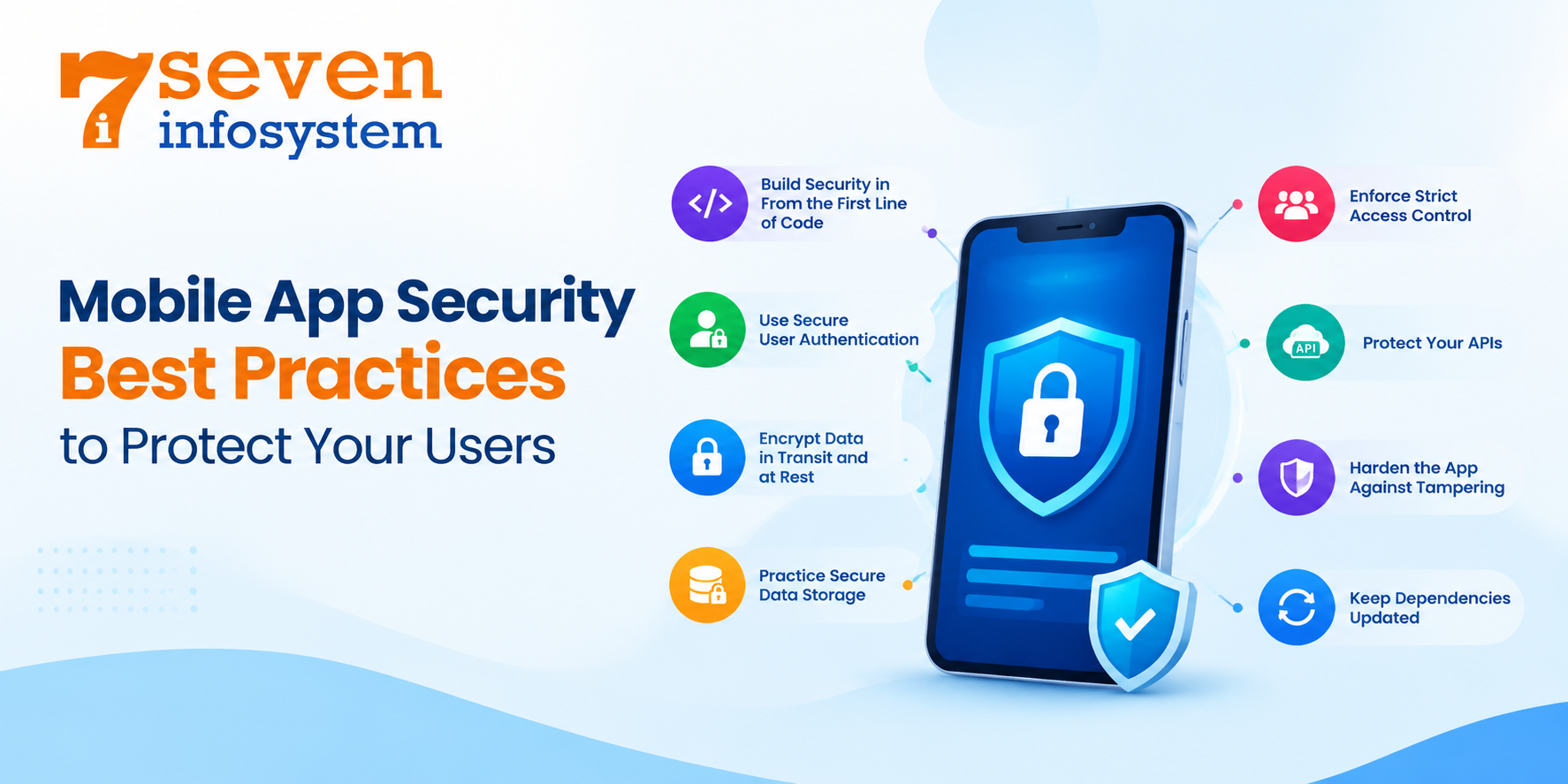
Build Security in From the First Line of Code
The process of creating a mobile application securely begins well before the testing process. Threat modeling at the design stage helps to identify vulnerabilities, which are much easier and less costly to fix at this stage. Just ask these two basic questions for each feature: What kind of data is this handling? Who should be allowed access to it? What happens if an attacker exploits it?
Following established Mobile App Security practices, such as those, in the OWASP Mobile Application Security Verification Standard (MASVS) gives your team a clear checklist instead of guesswork.
Use Secure User Authentication
Secure user authentication should be strong without being a pain to use. A few practices go a long way:
Offer multi-factor authentication, especially for sensitive actions like payments or password changes.
Support biometric login through the platform's built-in systems rather than custom-made solutions.
Use lived access tokens and refresh them safely.
Always verify credentials on the server never inside the app.
Lock or slow down accounts after repeated failed login attempts.
Standards like OAuth 2.0 and OpenID Connect exist for good reason. Using proven protocols is almost always safer than inventing your own.
Encrypt Data in Transit and at Rest
Mobile app encryption keeps information protected even if someone manages to intercept or steal it. For data in transit, use TLS for every connection, with no exceptions for requests that seem unimportant. Certificate pinning adds another layer by making sure the app only talks to your genuine server.
Data at rest should be protected with robust encryption algorithms like AES-256. Do not implement encryption yourself – it is easy to do something wrong even if you are an experienced programmer.
Practice Secure Data Storage
The best way to ensure data security and privacy is to avoid storing anything. Before deciding to save information, think whether it is really necessary. If yes, data should be stored using platform features – Android Keystore and encrypted preferences in case of Android and Keychain in case of iOS.
Watch out for leaks too. Sensitive details can slip into debug logs, crash reports, screenshots, in the app switcher and cached web content. Clean these up before every release.
Enforce Strict Access Control
Proper access control implies that each user and all parts of the application have the necessary rights only. It is recommended to perform the authorization at the server side in response to each request. The developer should only ask for permissions on the device that he really requires.
Protect Your APIs
Imagine that each call of the API was made by a malicious user. Thus, validate all data coming into the API and limit the amount of outputted data. Limit the number of calls made per time and require authentications of requests.
Harden the App Against Tampering
Application obfuscation makes reverse engineering much harder. Integrity checks can verify whether the app was tampered, and run-time checks can identify rooted/jailbroken devices, debuggers, and hooks. This does not mean that any of these techniques would make your application impossible to break – but it would increase the cost of such operation significantly.
Keep Dependencies Updated
Keep an inventory of every third-party library in your app and check it regularly for known vulnerabilities. Remove packages you no longer use. A smaller dependency list means a smaller attack surface.
Platform-Specific Tips: Android and iOS
Both of these two major platforms have strong foundations in terms of security, yet there are differences between them and each has its particularities.
Android App Security
The openness of the platform is good for it, yet it makes the application more susceptible to attacks. For example, apps may be installed without being downloaded from the Play Store. Also, many users use outdated versions of the operating system that are not updated anymore.
To strengthen Android app security:
Make sure that the activities, services, and content providers are non-exported unless needed by other applications.
Save cryptographic keys in Android Keystore.
Implement the network security configuration that disallows cleartext traffic.
Use Play Integrity API to validate the app and device integrity.
Apply R8 optimizations to the code.
iOS App Security
A closed ecosystem and strict App Store reviewing process make iOS a good starting point in terms of security; however, believing that iOS apps are secure by default is a grave error, since jailbreaking, unsafe storage, and unsecure network calls can cause serious problems.
For better iOS app security:
Use Keychain for storage of sensitive information with proper permissions set.
Ensure ATS is not disabled and no excessive exceptions are set up.
Employ Data Protection classes to keep all files encrypted on a locked device.
Use App Attest to confirm that requests come from a genuine copy of your app.
Hide sensitive screens when the app moves into the background.
How to Approach Mobile App Security Testing
carefully written apps have blind spots. That is why mobile app security testing should be a part of the development cycle, not a one‑off check right before launch.
Types of Testing to Include
Static code testing (SAST): The process of searching for potential security threats within an application's code when the program is not running.
Dynamic analysis testing (DAST): The testing of the mobile application while it is in use to observe its behavior, data storage, and transmission processes.
Interactive and runtime testing: The combination of both static and dynamic analysis.
Penetration testing: A process of testing the security of your application through the eyes of the hacker.
Useful Mobile App Security Testing Tools
There are numerous mobile app security testing tools that are either free or paid to be chosen from. The most popular ones are listed below:
MobSF (Mobile Security Framework): It is an automated static and dynamic analysis platform for mobile applications on Android and iOS.
Burp Suite: It is commonly used when it comes to intercepting and testing traffic from and to the app's backend.
Frida: It is a toolkit allowing testers to instrument and modify an application on the fly.
OWASP MASTG: Not a tool as such, but a detailed testing guide that explains what to check and how to check it.
The best results come from pairing automated scans in your CI/CD pipeline with periodic manual reviews by experienced testers. Automation catches the obvious issues quickly. People find the clever ones.
Choosing the Right Mobile App Security Solutions
While following coding best practices, many development teams also use additional mobile app security solutions to strengthen an application's protection. For example, these tools can help identify vulnerabilities, monitor threats, and protect sensitive user data. However, the right combination depends on several factors, including your app's risk level, available budget, and target audience. Therefore, choose security solutions that meet your application's specific needs while providing reliable protection.
Runtime Application Self-Protection (RASP)
These tools are embedded in the application itself and can react to any threat immediately. Depending on the detected situation, RASP solutions can deny the threat, warn the developer about this issue or stop the session of the user.
Mobile Application Firewall
Mobile application firewall analyzes traffic directed towards your backend. The firewall can protect you from malicious requests, bots and other automatic attacks. Some solutions are developed especially for mobile traffic and can differentiate your application from scripts imitating it.
App Shielding and Obfuscation Tools
Professional app shielding solutions do not limit themselves to the obfuscation only but use advanced encryption, string encryption and anti-tampering features which make the process of reverse engineering significantly harder.
Threat Monitoring and Analytics
You can't fix a problem if you don’t know it’s happening. Monitoring tools keep an eye on user behavior spikes in failed logins and strange API activity. This helps your team catch issues fast even when things look normal at first.
No one solution does it all. Think of these tools as layers, in a defense system. Each one catches what the others might pass through. Together they make your app much stronger.
Building a Security-First Mindset Across Your Team
Tools are important, and so are processes, but culture is just as important. The most secure applications are generally developed in teams where everyone takes care of security and not just the security expert.
A few habits help make that happen:
Train your developers in secure coding using examples of issues in your own code.
Incorporate security testing in code review processes.
Set up a clear process for handling vulnerability reports, including a way for outside researchers to contact you.
Plan your incident response before you need it, so everyone knows exactly what to do.
Deploy security fixes quickly and make sure your customers install them.
Once security becomes a part of your regular routine, it stops being a bottleneck and becomes what it should be – quality control.
Conclusion
Mobile app security is not about making one brilliant move. Instead, it requires consistent, sensible decisions throughout the development process. For example, developers should use threat-informed design, protect data through encryption and secure storage, verify users, restrict access, and conduct thorough security testing.
With mobile app development, security must remain a continuous priority because hackers constantly look for new ways to exploit vulnerabilities. Therefore, start by understanding the security basics, identifying the most critical weaknesses in your mobile application, and fixing them first. Additionally, apply regular security updates, perform thorough testing, and strengthen data protection to make your app more difficult to attack. As a result, you can build user trust and attract more customers.
Ultimately, security involves more than just technical measures. Instead, it reflects your ongoing commitment to protecting every person who uses your application.
FAQs
1. What is mobile app security?
It's the practice of protecting mobile apps, their data, and their users from threats like data theft, unauthorized access, and tampering.
2. What are the most common mobile app security risks?
Insecure data storage, weak authentication, unencrypted communication, poor access control, and outdated third-party libraries top the list.
3. How often should an app be security tested?
Run automated scans with every build, and schedule deeper manual testing before major releases or at least once or twice a year.
4. Is iOS more secure than Android?
iOS has a more controlled ecosystem, but either platform can be secure or vulnerable depending on how the app is built.
5. Do small apps really need strong security?
Yes. Attackers often go after smaller apps because they expect weaker defenses, and even a minor breach can seriously hurt user trust.